

Music Player - Audio Player
Mobile_V5
I spent time with Music Player - Audio Player as a straightforward way to listen to music already stored on an Android phone, and its appeal became clear quickly: it focuses on playback rather than trying to turn the phone into a full streaming service. It comes from Mobile_V5, belongs to the Music & Audio category, and is available free of charge. That makes it easy to try without making a purchase decision first, especially if your main goal is to open local audio files and get more control over how they sound.
The app has been around since Aug 1, 2013, and its current version is 8.0.9. It supports Android 6.0 and later, carries an Everyone age rating, and has reached over 100 million installs. Its average rating is 4.6 from around 1.6 million ratings, with roughly 37 thousand written reviews. Those figures do not replace personal testing, but they do suggest that this is a familiar choice for a very large audience rather than a new or experimental player.
What Music Player - Audio Player is really useful for
At its core, this is a local music player with sound-shaping tools. The important distinction is that I would not approach it as a replacement for a subscription streaming platform. Its natural role is playing audio that is already available on the device, whether that means music transferred from a computer, files saved from another source, or recordings that the phone can recognize. If you want a simple library and playback controls without building your listening around an online catalog, it makes much more sense.
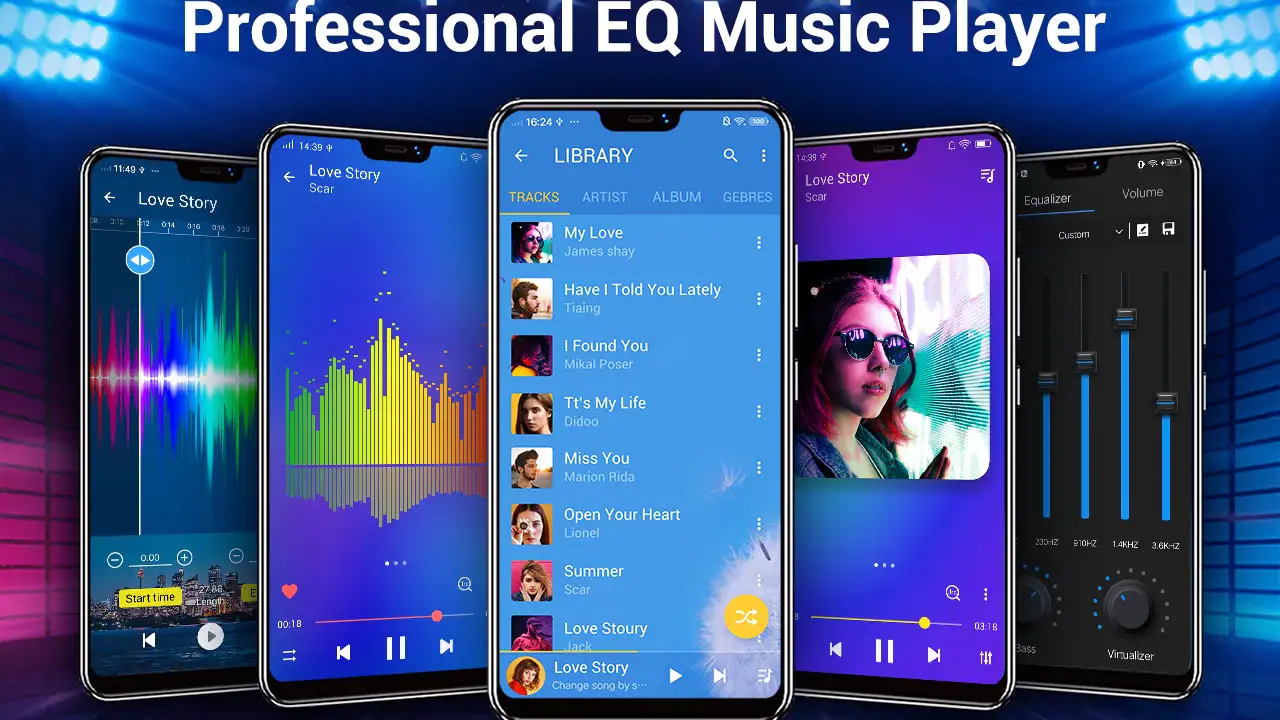
The store summary highlights fast downloading, audio playback, an equalizer, bass boost, and a sound changer. In practical terms, the equalizer and bass controls are the features that give it more personality than a basic system player. I found that useful when switching between different headphones or listening environments. A pair of small earbuds may benefit from a different balance than a car stereo, while a speaker in a room can make excessive bass sound muddy very quickly.
I would start with modest adjustments rather than pushing every slider. Bass boost can make quiet or thin tracks feel fuller, but it can also blur vocals and percussion. The equalizer is most helpful when used to correct a listening setup, not when treated as a button for making every song louder. That is one of the app’s practical strengths: it gives casual listeners an accessible way to experiment, while still leaving room for someone who pays attention to how different headphones reproduce sound.
Latest News

Uber Eats Under Pressure: What Happens When Delivery Goes Wrong

How QR & Barcode Scanner Adapts to Android and iOS Innovations

Why Waze Navigation & Live Traffic Is Your Essential Travel Companion

CapCut Mastery: Unleash Hidden Features for Pro-Level Editing

How OS Updates Enhance Roblox Adventures

Teacher Simulator: Exam Time Turns Quick Classroom Judgments into a Repetitive Loop
A useful everyday listening routine
Imagine downloading a few albums for a long trip and keeping them on your phone. With a conventional file browser, finding individual tracks can become irritating, especially when filenames are inconsistent. A dedicated player gives those files a more natural listening home. I would open the library before leaving, check that the tracks appear correctly, choose a comfortable sound setting, and then use the phone as an offline music source without needing to search through folders each time.
That workflow is also useful at home. I keep different expectations for background music, focused listening, and a quick playlist while cooking. A local player is convenient when I do not want recommendations, account prompts, or a constantly changing online catalog. The trade-off is that the quality of the experience depends heavily on how well the audio files are organized and identified on the phone. The app can make playback easier, but it cannot magically repair a chaotic collection.
One tip I would give new users is to test the sound controls with a familiar song rather than an unfamiliar track. You will notice changes in vocals, bass definition, and harsh high frequencies more reliably when you already know what the recording normally sounds like. After that, try the same setting with another genre. A bass-heavy adjustment that feels enjoyable on electronic music may be unpleasant on acoustic recordings or spoken audio.
Gallery
How it compares with the usual alternatives
Compared with the basic player that comes with a phone, this app is more attractive if equalizer access and bass adjustment matter to you. The built-in option may be enough for someone who only taps a song and listens, but it can feel limited when you want to make a particular pair of headphones sound more comfortable. Music Player - Audio Player puts those controls closer to the listening experience instead of making you search through separate device settings.
Compared with a streaming app, the difference is more fundamental. Streaming services are better when you want discovery, editorial playlists, synchronized libraries, and immediate access to music you do not own locally. They are usually the more convenient choice for someone whose collection changes every day. This player is better suited to people who already have their audio files and want a focused tool that does not depend on finding a song inside a massive online catalog.
Dedicated audiophile players can still be preferable for listeners who need highly specialized library management, detailed file information, or advanced audio routing. I would not choose this app simply because it has an equalizer and assume it replaces a professional-grade audio tool. Its appeal is balance: it offers more control than a barebones player without asking a casual listener to learn a complicated system.
Where the free price changes the decision
The cost is refreshingly simple: the app is free. That means the first question is not whether its feature set justifies a subscription or one-time purchase, but whether it fits the way you listen. For someone who wants local playback and basic sound customization, free access makes experimentation worthwhile. You can install it, compare it with the current player on the phone, and keep it only if the controls or interface improve your routine.
That free entry point is especially valuable for an older phone that still meets the Android 6.0 minimum but does not feel suited to a large modern streaming application. I would still judge the actual experience on the individual device, because library scanning, file organization, and audio behavior can vary between phones. The important value proposition is not that free automatically means better; it is that there is no purchase barrier to discovering whether this particular approach works for you.
I also like that the app’s value can be judged through use rather than promises. If you never touch an equalizer, never play local files, and mainly listen through an online service, the free installation may not add much. On the other hand, if you regularly move music onto your phone, a player with accessible sound tools can become useful every day without adding a recurring cost to that habit.
Small details that affect the experience
Sound adjustment is not automatically an improvement. I found it better to make one change at a time and listen for side effects. Raising several frequency ranges together can create a louder signal that initially seems more exciting but becomes tiring after a few songs. Bass boost deserves particular restraint: it can help compensate for weak earbuds, yet it may overwhelm the rest of the mix when the headphones already produce strong low frequencies.
The sound changer is another feature I would treat as occasional entertainment rather than a serious listening tool. Voice effects can be amusing when sharing a phone with friends or experimenting with a recording, but they are not the reason I would select this app for a carefully balanced music collection. The equalizer and ordinary playback are the parts with lasting practical value; novelty effects are more situational.
Organization is the less glamorous part of using a local player. Before blaming the app for a missing track, I would check whether the file is stored in a location the phone can read and whether its tags are sensible. Albums with inconsistent artist names can appear split into several entries, and poorly named files can make browsing less pleasant. This is a trade-off against streaming services, where catalog metadata is generally prepared for you.
There is also a difference between changing the sound for headphones and changing it for a car or room speaker. I recommend checking the same setting in the environment where you will actually use it. A profile that sounds clear late at night through earbuds may be too sharp through a larger speaker. Keeping the adjustment conservative is the safest approach if you move between devices often.
Who will get the most value
I think this app is a strong fit for Android users with a personal collection of audio files. It is also useful for listeners who want more immediate sound control than the default phone player provides, particularly when they switch between inexpensive earbuds, wired headphones, and external speakers. The free price makes it easy to try as a practical replacement rather than a major commitment.
It can suit someone preparing for travel, commuting through areas with unreliable connectivity, or simply preferring music that is already saved locally. It also works for people who dislike the distraction of recommendations and want to choose their own albums. In those cases, the app’s straightforward purpose is an advantage rather than a limitation.
I would be less enthusiastic for a person whose entire library lives in a streaming account. If you expect synchronized playlists across several devices, cloud-based recommendations, or instant access to unfamiliar artists, an online service will probably feel more complete. Likewise, listeners who demand very advanced audio management should compare this with a specialist player before settling in. The presence of an equalizer does not make every player equally deep.
Another group that may want to skip it is anyone who rarely changes audio settings and already feels comfortable with the phone’s built-in player. Installing another app adds another library view and another set of controls. Free does not mean frictionless: the benefit has to be noticeable enough to justify changing an established routine.
My final recommendation
After using it as a local listening tool, I see Music Player - Audio Player as a sensible free option for people who want ordinary playback with extra sound controls. Its strongest case is not a huge ecosystem or a streaming catalog. It is the combination of accessible audio playback, equalizer functions, bass adjustment, and a low-risk way to test those tools with music you already keep on your phone.
The limitations are equally clear. It will not replace the discovery and synchronization features of a streaming platform, and its sound effects should be used carefully rather than treated as automatic upgrades. The quality of your experience will also depend on the organization of your local collection, something no player can completely solve for you.
My advice is simple: try it if your phone contains music you want to browse and you have ever wished for better control over the sound. Start with a familiar track, keep the adjustments subtle, and test them on the headphones or speaker you use most. If you mainly stream music or need professional-level library tools, choose the alternative that matches that priority instead. For everyone in between, the free access makes this a practical, low-risk upgrade to explore, and its large user base and 4.6 average show why it remains a recognizable choice in Android audio.
FAQs for Music Player - Audio Player
What file formats does Music Player - Audio Player support?
Music Player - Audio Player supports a wide range of audio formats, including MP3, AAC, WAV, FLAC, and more. This versatility ensures you can play nearly any audio file without having to convert them first, making it a convenient choice for users with diverse music collections.
Does Music Player - Audio Player have offline playback capability?
Yes, Music Player - Audio Player allows offline playback. Once your music is downloaded to your device, you can enjoy your favorite tracks without an internet connection, making it ideal for travel or when you're in areas with poor connectivity.
What customization options are available in Music Player - Audio Player?
The app offers various customization features, including customizable themes, equalizer settings, and playlist management. Users can tailor their listening experience with specific sound profiles and interface designs, allowing for a personalized and immersive music experience.
Is there a premium version of Music Player - Audio Player, and what does it offer?
Yes, Music Player - Audio Player offers a premium version that removes ads and provides additional features such as advanced audio settings, exclusive themes, and enhanced support. This upgrade is perfect for users who want an uninterrupted and enriched music experience.
How user-friendly is Music Player - Audio Player for beginners?
Music Player - Audio Player is designed with a clean and intuitive interface, making it user-friendly for beginners. The straightforward navigation and easy access to essential functions ensure that even those new to music apps can quickly learn to enjoy their music library with ease.
Pros
- User-friendly interface with intuitive controls.
- Supports a wide range of audio formats.
- Customizable equalizer for tailored sound.
- Offline playback available for downloaded tracks.
- Minimal battery consumption during use.
Cons
- Contains ads that can interrupt playback.
- Limited free features without premium upgrade.
- Some features require internet connection.
- Occasional glitches in playlist management.
- No built-in lyrics support for songs.


